Which Google Search Operators Still Work in 2026? We Tested Them
August 1, 2026 saw a post in r/google mentioning the inability to filter by date in searches was going on for weeks. Many of the 50 responses were similar reports. The advice being given was older than the issue: just put after: and a date into your search string in the search box. u/HeyTomKay suggested the js for the date drop-down might be the issue, which makes sense why the text command still worked, although it wasn't working for another two responders.
I think that thread is the best reason to learn search operators in 2026. A search operator is a short command you type into the search box, like site: or filetype:, that tells a search engine exactly what to match, and menus move and filters break while a few of these keep working. I work at RankControl, an AI SEO and AEO platform, and our team ran 19 operator searches on Google from the US on October 19, 2026, because several of the old operators do nothing anymore. On November 19, 2026, I ran them again, and my first re-run gave me an answer I could not trust, which is most of what this post is about.
How I ran the checks
The October test used Google from the US, and for operators that match words, such as quotes and intitle:, the team opened the result pages to see whether the match was really there. On November 19, 2026, I sent the same searches, one time each, through two services that run a Google search from the US and hand back the results page as data: cloro, which I call Tool A, and DataForSEO, which I call Tool B.
For any word based ones I'd use a script to load each of the results pages then count how many pages had the word. So "5 of 6" means I loaded 6 pages and 5 pages contained the word. I'm ignoring any pages that block the script by an error like 403/429 etc. For 4 of the conflicts where the tools don't match (filetype:, minus sign, intitle:, allintitle:) I've re-run the search in a regular Chrome window on my Mac using gl=us (which is me asking Google for US results even though I'm not connected to the US).
Which search operators still work
Here are all the operators, lined up. The last column indicates whether or not Google's own help page mentions it, based on what I saw on November 19, 2026.
| Operator | Example | October 19 | November 19 | On Google's help page |
|---|---|---|---|---|
| site: | site:reddit.com crm for small business | Worked, 10 of 10 results on Reddit | Worked, 10 of 10 on Reddit in both tools | Yes |
| filetype: | filetype:pdf content marketing report 2026 | Worked, 10 of 10 were PDFs | Chrome 10 of 10 PDFs, Tool A 9 of 10, Tool B 0 of 10 | Yes |
| "quotes" | "roofing crm software" | Mostly worked, 5 of 7 pages had the phrase | Tool A 5 of 6 pages had it, Tool B 1 of 6 | Yes |
| Minus sign | roofing crm -jobnimbus | Leaky, 4 of 9 pages still mentioned it | Tool A 0 of 6 pages did, Tool B 3 of 8 | Yes |
| after: | ai overviews clicks after:2026-09-01 | Worked, every dated result was from October | Worked, 9 of 9 dated results, October 1 to November 17 | Yes |
| before: | ai overviews clicks before:2024-01-01 | No results for this query | Worked, 9 of 9 dated results, 2016 to December 26, 2023 | Yes |
| OR | (pipedrive OR copper) crm pricing | Worked, 6 of 6 | Worked, 9 of 9 results named one of them | No |
| intitle: | intitle:"roofing crm" | Worked, 7 of 7 titles | Chrome 9 of 9, Tool A 8 of 8, Tool B 3 of 9 | No |
| allintitle: | allintitle:roofing crm pricing | Mixed across two tests | Chrome 6 of 9, both tools 0 of 9 | No |
| inurl: | inurl:pricing crm software | Leaky, 2 of 9 URLs had the word | Leaky, 4 of 9 (Tool A), 2 of 9 (Tool B) | No |
| AROUND(3) | crm AROUND(3) roofers | Mostly worked, 6 of 7 | Did not hold, 2 of 8 (Tool A), 1 of 8 (Tool B) | No |
| Wildcard (*) | "best * for roofing companies" | Didn't hold in our checks | Didn't hold, 0 of 10 (Tool A), 0 of 9 (Tool B) | No |
| cache: | cache:hubspot.com | Gone, no results | Gone, no results in either tool | No |
| related:, info:, link: | related:hubspot.com | Treated as plain words | Plain words again, 9 of 9 related: results were HubSpot's own pages | No |
If you read the far right column, you still see the October pattern: most of Google's documented six operators were still working. The undocumented ones vary from the good (OR, intitle:) to the leaky (inurl:) and some are nearly dead. But on November 19, 2026, the result of five of the 14 rows (filetype:, quotes, the minus sign, intitle:, allintitle:) depended on the tool that you used.
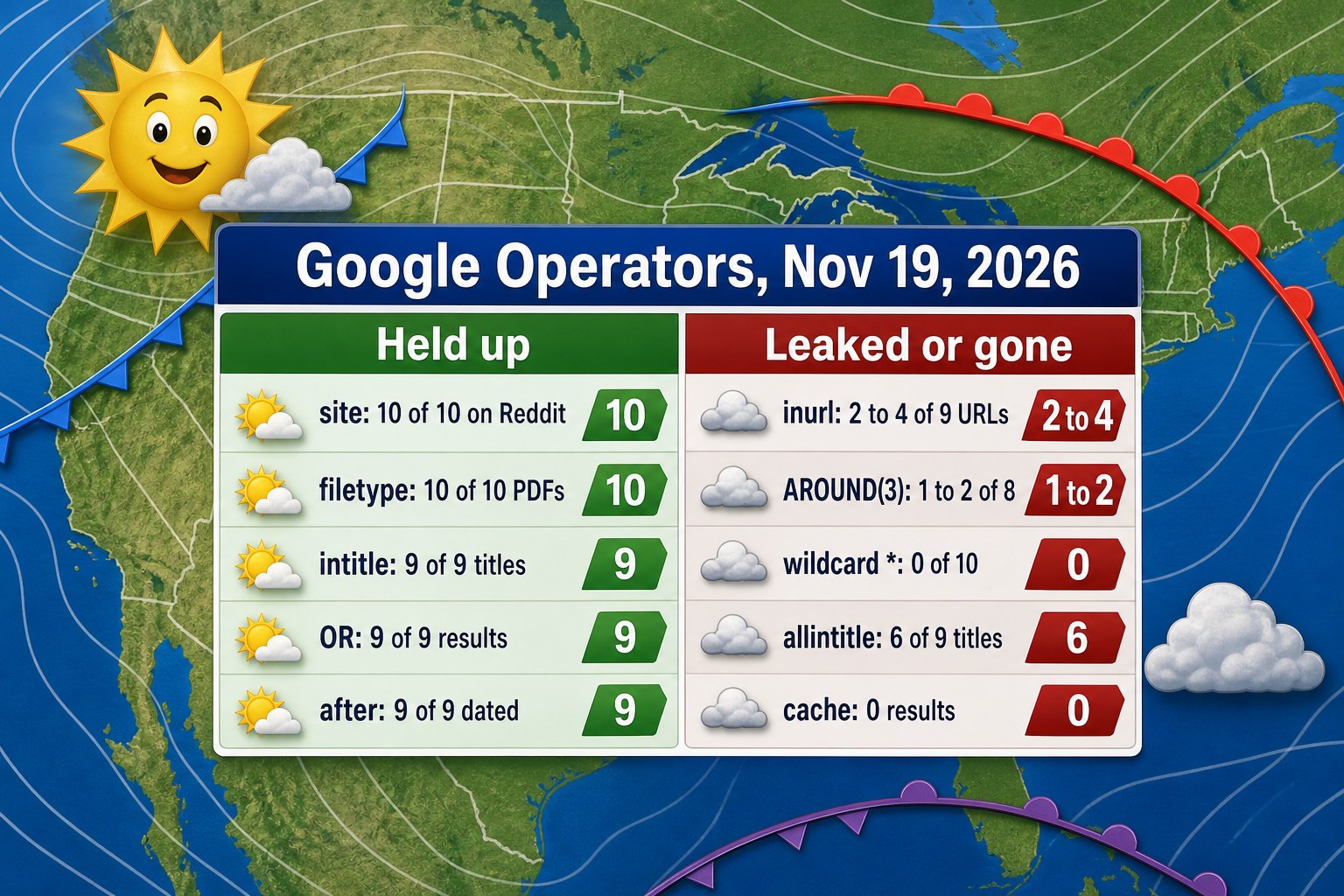
Counts from the November 19, 2026 checks. The filetype:, intitle: and allintitle: readings come from a normal Chrome window, the others from the two result tools, shown as a range where they differed.
Why the tools disagreed
The October write-up had already flagged this trap. The search data provider the team used had two ways to fetch Google results, and one of them returned non-Reddit results for site:reddit.com, so the operator was quietly dropped while the other passed it through correctly.
On November 19, 2026, I hit the same trap in a new place. Tool B returned 0 of 10 PDFs for filetype:pdf content marketing report 2026 on both of its fetch endpoints, a plain one and an advanced one, and handed back ordinary web pages such as a statistics roundup from WinSavvy, while Tool A returned 9 of 10 PDFs and Chrome showed 10 of 10, each labeled PDF by Google. Tool B also let only 3 of 9 titles through for intitle:"roofing crm", where Chrome showed 9 of 9. Tool A had its own miss: for site:hubspot.com intitle:vs it returned Victoria's Secret pages, while Tool B returned 10 of 10 HubSpot pages, 9 of them with "vs" in the title.
A tool that drops an operator still hands back ten plausible results, so my first pass through Tool B nearly became a line saying filetype: was dead. The October write-up's advice was to open one of those searches in a normal browser and compare them, and on November 19 that comparison is the only reason the table above says 10 of 10 in the filetype: row.
The six operators Google documents
Google's help page on refining searches lists six: quotes for an exact word or phrase, site: for one domain, the minus sign to leave a word out, before: and after: to filter by date (used together they give a date range), and filetype: for PDFs and other documents. Those are the ones I would build a habit around, since Google stands behind them.
The page also gives a rule that is easy to forget, that there is no space allowed between the operator and the term, so site:nytimes.com works and site: nytimes.com won't. I tested that exact pair with the word climate added: with the space, 7 of 9 results were on a nytimes.com address in both tools and two were New York Times videos on YouTube, while without the space all 10 results in Tool B and all 9 in Tool A were on nytimes.com.
Quotes were the first operator to split the tools. In October, 5 of 7 pages for "roofing crm software" had the exact phrase; on November 19, 5 of 6 opened pages from Tool A had it and 1 of 6 from Tool B, so I would not call quotes fine or broken on this evidence. A commenter in the r/google thread, u/SugarSpellItOut24, wrote that quotes and the minus sign had stopped working for them as well.
The date operators held up. On November 19, ai overviews clicks after:2026-09-01 gave 9 of 9 results with a date, from October 1 to November 17, 2026, and the same words with before:2024-01-01 gave 9 of 9 dated between July 31, 2016 and December 26, 2023, where the same search returned no results at all in October. Google's page says these two look at when a document was last updated, and one result in the before: run, a Huckabuy page dated April 6, 2022, quotes a September 2025 study in its snippet, so the date is the one Google has on record, not necessarily the age of the text.
Operators that work but aren't documented
A few popular operators are missing from Google's help page and still did their job. OR brought back results with either name: all 9 results for (pipedrive OR copper) crm pricing mentioned Pipedrive or Copper in both tools, matching the 6 of 6 from October. In Chrome, intitle: put the phrase in the title of 9 of 9 results, with titles such as Roofr's "The #1 Roofing CRM" and Centerpoint Connect's "What Is a Roofing CRM?".
The allintitle one is mixed. In Chrome, 6/9 titles on allintitle:roofing crm pricing had all three words. 7/9 results had "Missing: allintitle:" written by Google below them (which makes it seem like Google considers it a word it can't find, so maybe the 6/9 is as much about the topic as it is about the operator), and 0/9 in all three runs from both tools.
Others act more like hints. inurl:pricing crm software gave 4 of 9 URLs containing "pricing" in Tool A and 2 of 9 in Tool B, against 2 of 9 in October, and the same words without the operator gave 3 of 9 in Tool B, so the operator barely moved the count. People noticed the same thing in 2026: on February 25, a poster in r/SEO saw a "Missing: inurl: intext:" note at the bottom of the results, and on May 6, another wrote that inurl: now seemed to be treated as ordinary text, while a reply on the February thread said inurl: still worked better than intext:, which was about 50/50.
AROUND(3), which asks for two words within three words of each other, went from 6 of 7 in October to 2 of 8 in Tool A and 1 of 8 in Tool B for crm AROUND(3) roofers, where I counted a result only if the two words sat that close together on the page or in the snippet. The wildcard search "best * for roofing companies" never returned the phrase, in 0 of 10 results from Tool A and 0 of 9 from Tool B, only lists of local contractors such as "Top 10 Best Roofing Companies in San Antonio" and "22 Top Roofers in Colorado Springs, CO".
The minus sign leaked in October even though Google documents it: for roofing crm -jobnimbus, 4 of the 9 result pages still mentioned JobNimbus in their text. Tool B's pages on November 19 showed 3 of 8, among them flashcrafter.ai, whose title is "Roofer CRM Compared: JobNimbus, AccuLynx, Roofr", but the plain search without the minus sign also had 3 of 8, because the minus dropped OnCallClerk and Estimate on Demand and brought in kraken-ops.com and flashcrafter.ai. Tool A's six pages had none, and Chrome's eight results showed no JobNimbus in any title or snippet. My October guess was that Google uses the minus sign to push results down rather than strip out every mention, and Tool B's leaks fit that, though Tool A and Chrome show no sign of it.
Operators that are gone
Some old favorites do nothing now. In February 2024, Google's Search Liaison account confirmed that cached links had been removed, and The Register, reporting it on February 5, 2024, added that the cache: command was going away too. On November 19, 2026, cache:hubspot.com returned no results in either tool, the same empty page the October test saw.
The related:, info: and link: operators still return results, just not the kind they used to. related:hubspot.com gave 9 of 9 pages from HubSpot's own knowledge base and community in both tools, where the old operator listed related sites, and in Tool A info:hubspot.com gave HubSpot's homepage, help center and about page plus Wikipedia and LinkedIn, not a page-info card. Tool A's link:hubspot.com results included a Facebook post titled "Looking for link insertion on HubSpot.com", which shows the word link being read as a word. Each one acts like the plain word, the same as in October, and the October write-up added that link: stopped showing linking pages years ago, which is why SEO tools took over that job.
Search operator recipes for SEO
Operators are powerful when you string them together. Here are the 7 searches we keep handy. The last column shows the results on November 19, 2026 when we put a real name in instead of the placeholder.
| Goal | Search | What it returned |
|---|---|---|
| Spot-check which of your pages are indexed | site:yourdomain.com (I used site:bearblog.dev) | 10 of 10 results on bearblog.dev in both tools |
| Find a competitor's comparison pages | site:competitor.com intitle:vs (I used site:hubspot.com) | Tool B: 10 of 10 on HubSpot sites, 9 with "vs" in the title. Tool A: Victoria's Secret pages |
| Find mentions of your brand on other sites | "your brand" -site:yourdomain.com (I used "HubSpot CRM" -site:hubspot.com) | 8 of 8 off hubspot.com in both tools, one of them on hubspot.in, a different domain |
| Find recent Reddit threads in your niche | site:reddit.com "your category" after:2026-07-01 (I used "crm for small business" after:2026-09-01) | Tool A: 10 of 10 Reddit threads, posted September 19 to November 18, 2026 |
| Find reports and studies to cite | filetype:pdf "your industry" report 2026 (I used "content marketing") | Tool A: 8 of 10 verified PDFs. Tool B: 0 of 10 |
| Find guest post openings | intitle:"write for us" your topic (I used crm software) | Tool A: 9 of 9 titles had "Write for us". Tool B: 1 of 9 |
| Find resource pages for link building | intitle:resources inurl:links your topic (I used crm software) | 0 of 9 results had both in either tool, only general CRM lists |
Combine three of them (site/quoted phrase/date) and you get a busy category narrowed down to a few new threads in a matter of seconds. The count line on Google for site:reddit.com crm for small business said around 201,000 results on Tool B and when I combined it with the quoted phrase and after:2026-09-01 it said around 268 results with 10 new threads in the past two months showing up on the first page. (but I was only able to verify the quoted phrase being in the title or snippet of only 2 of them, due to Reddit cramming it up with scripts). That's what the r/google folks were looking to get back once the date filter died.
Don't trust the site count too much. It shows pages Google can find, which isn't the same as an exact index count, and the figure Tool B read for site:bearblog.dev on November 19, 2026, about 42,500 results, is a rough size and nothing more, so go to Search Console when you need the real number.
Most teams skip the mentions search, and I think that's a mistake. It turns up unlinked brand mentions you can ask to turn into links, and the HubSpot run above shows what turns up: a Coursera course, a Forbes Advisor review and a Reddit thread that name the product without being on the product's own domain. For link building, the intitle: searches find pages that already invite contributions or list resources, and on November 19 the two cases split: the "write for us" search found its pages and the resources search did not.
Search operators in AI search
ChatGPT now searches the web for many questions, so the team tried operators there too. On October 19, 2026 they asked it four questions and looked at the sources it cited. On November 19, 2026 I asked the same four, twice each, through cloro's ChatGPT scraper (logged out, with web search switched on), which returns the cited sources but not the searches ChatGPT ran.
| Question typed into ChatGPT | October 19 | November 19, two runs |
|---|---|---|
| site:reddit.com best crm for small business | All 8 sources were Reddit threads | 4 of 4 and 5 of 5 sources were Reddit threads |
| best crm for small business | 10 sources, none from Reddit | 12 and 15 sources, none from Reddit |
| filetype:pdf content marketing report 2026 | 4 of 13 sources were PDFs | 2 of 10 and 1 of 7 sources were PDF files |
| "crm for roofers" pricing | Quotes dropped when ChatGPT rewrote the search | Run 1 cited one site, crmforroofers.com. Run 2 cited 14 sites about roofing CRMs in general |
The site operator gave the clearest result again. In October ChatGPT passed it straight into its own searches, with queries like "site:reddit.com/r/smallbusiness best CRM for small business recommendations", and ask the same question without it and you get no Reddit sources at all. On November 19, the plain question gave 0 Reddit sources in both runs, while the site: version gave only Reddit, though with fewer sources, 4 and 5 against 8 in October.
Filetype only half works. Back in October when ChatGPT was doing it both literally, just the search I typed in, and in more flexible format, no operator, it was around a third PDFs. On November 19th it was less than that, 2 of 10 and 1 of 7, and everything else was a web page: eMarketer or Conductor articles, Scribd and SlideShare pages and a HubSpot blog entry about their marketing industry trends report, though they did identify the list they gave as content marketing reports in PDF form in the actual answer itself.
Quotes did not work in October, as ChatGPT changed the question and made a longer search. November 19 1st run treated "crm for roofers" as company name and returned response based on crmforroofers.com only. 2nd run did something else: it provided general price table for roofing CRM from 14 sites, including pages of JobNimbus, Roofr, AccuLynx and so on. Our team made some earlier experiments on semantic search and noticed that ChatGPT replaces rare phrases with common phrases in the same way.
So for AI research, site: is the operator worth typing. It is a quick way to see, inside an AI answer, what a community says about your category or what a single publisher has written, and on November 19 it kept ChatGPT to Reddit in 2 of 2 runs.
What this takes by hand
This is how long it takes per month we estimate to do SEO research using operators.
| Task | Hours a month |
|---|---|
| Brand mention searches and outreach | 2 to 3 |
| Competitor page checks | 1 to 2 |
| Reddit and forum research | 2 to 3 |
| Link prospecting with intitle: searches | 2 to 4 |
| Checking AI answers by hand | 2 to 3 |
| Total | 9 to 15 |
The last row is the one a tool can take over: RankControl's AI visibility tracker tracks citations across 7 AI engines: ChatGPT, Perplexity, Claude, Gemini, Grok, Google AI Mode and Google AI Overviews.
Limits of these checks
Each search ran once per tool, from US locations, on one day, and Google changes results all the time, so an operator that acts as a hint can behave differently on another query. The Chrome checks came from my Mac with gl=us rather than a US connection, and I read only the first page of results. Pages that blocked my script left some counts at 6 or 8 instead of 9 or 10, which is why the denominators move. I did not repeat the quotes searches in Chrome, so that row rests on the two tools alone. Tool A does not show the searches ChatGPT ran, so I can say what ChatGPT cited but not which operator text it passed on.
Bing has its own set of operators, and Microsoft's advanced search keywords page, which I read on November 19, 2026, lists site:, filetype: and intitle: among them. A normal browser is the place to try any of them, because the October automated Bing checks came back unreliable and we haven't reported them, and I did not retest Bing this time.